Acornsoft *TERMINAL
I've been struggling with a Beeb (BBC Micro)
realted comms problem for a while. There are
a plethora of terminals avaliable for it but
they all have their shortfallings. Here is an
example:
ATerm
+ XYZmodem transfers- B/W, Limited Curses and ANSI support, 9600max
AnsiTerm
+ Pseudo 80 Column 4 Colors, XYZmodem transfers- Limited Curses and ANSI support, 9600 max, cursor keys
Commstar
+ Menu system- B/W, VT52, 9600 max, Xmodem(CRC) only
CommstarII
+ Menu system- B/W, VT52, 9600 max, Xmodem only
*Terminal
+ 19200 support, early VT100 support- No file transfers, very limited ANSI, no ^[m support
Xterm
+ Some ANSI support- B/W, has XYmodem but modern BBS don't like it
The best option out of these has usually been AnsiTerm for connecting remotely to modern systems and 90% of the time it was great. The drawbacks were squishing the text to create a pseudo 80 column display with 4 colours (in reality using the BBC Micros 40 Column Mode 1 to achieve a 4 bit 80 column mode) makes them quite blocky and strains the eyes after a while. The biggest issue is it does not allow the user to redefine the cursor keys (the BBC Micro cursor keys can be set to send ascii codes *FX4,2) to the host, but setting this in Aterm does not work, neither does redefining the cursor keys with *KEY15|[[A.
I began to write a terminal emulator in 6502 assembly (which you
can find the source for in the BBC 6502 project pages) but
eventually gave up when trying to fix a cursor location bug which
ended up really messing up everything...and as usual I was editing
the live version and have no backup!
I turned my attention to *Terminal as I wondered if there was a
way it could be used with NewModes a rom by JGH (the same person
who wrote xterm), which pulled the same trick as AnsiTerm by
creating an 80 column 4 colour mode; however the fonts in NewModes
are much kinder to the eyes. And so the adventure began.
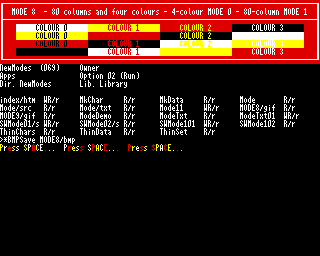
Swaping to mode 8 (the pseudo 80 column mode supplied by NewModes) and then loading *TERMINAL resulted in the new Mode 8 font, but with Mode 1 spacing (so still 40 characters). However loading *TERMINAL in a standard mode and then once open at the = prompt issuing VDU22,8 (change to mode 8) it worked. Now I had the built in *TERMINAL rom using 4 colours in 80 columns, I just needed to get the host to support it. A long time ago I found a termcap file on the *. forums (a BBC Micro treasure trove), with a little adaptation it too could support 4 colours:
bbc4|Master 128 4 Colour ANSI mode, am, cols#80, lines#32, vt#3, it#8, colors#4, bel=^G, clear=\EPVDU12\E\\, cr=\r, cub=\E[%p1%dD$<2/>, cub1=^H, cud=\E[%p1%dB$<2/>, cud1=\n, cuf=\E[%p1%dC$<2/>, cuf1=\E[C$<2/>, cup=\E[%i%p1%d;%p2%dH$<5/>, cuu=\E[%p1%dA$<2/>, cuu1=\E[A$<2/>, ech=\E[%p1%dX$<3/>, ed=\E[0J$<50/>, el=\E[0K$<3/>, el1=\E[1K$<3/>, home=\E[H$<5/>, ht=^I, ind=\n, is2=\E[>0l, kbs=^H, kcub1=\210, kcud1=\212, kcuf1=\211, kcuu1=\213, khome=\E[;H, nel=\r\n, op=\EPVDU17\,3\,17\,128\E\\, rf=/usr/lib/tabset/vt100, ri=\EM, rmcup=\EPVDU17\,3\,17\,128\E\\, smcup=\EPVDU17\,0\,17\,129\E\\, rmso=\EPVDU17\,3\,17\,128\E\\, smso=\EPVDU17\,0\,17\,130\E\\, setaf=\EPVDU17\,%p1%d\E\\, setab=\EPVDU17\,%{128}%+%p1%d\E\\, rev=\EPVDU17\,131\,17\,0\E\\, sgr0=\EPVDU17\,3\,17\,128\E\\, setf=\EPVDU17\,%p1%d\E\\, setb=\EPVDU17\,%{128}%+%p1%d\E\\,
The magic was explained in the BBC Master Reference Manual, when the host sends ^P it can access the BBC Micros VDU drive and send any VDU command. So above is sending various VDU17 (change colour) commands.
Mode 1/8 Default Palette
Foreground |Background ------------+------------ 0 - Black |128 - Black 1 - Red |129 - Red 2 - Yellow |130 - Yellow 3 - White |131 - White
VDU17,0,17,129 would give| Black text on a Red background. |
With this handy little tool I was able to use Curses and NCurses based applications. *Terminal also allows for the cursor keys to be programmed to function correctly; bonus.
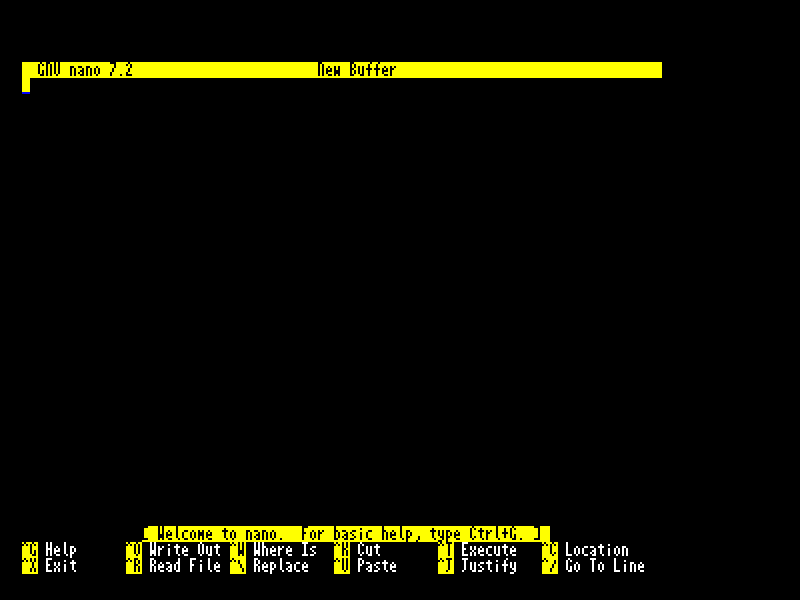
Whilst I was looking up
how the ^P control codes were working I discovered that the
built in *TERMINAL was future proofed. For any control code (CSI)
that it doesn't understand (for example ^[
10 REM Source for [m (8 Colour Version)
20 DIM code 300
30 org=&2F00
35 :
40 oswrch=&FFEE
45 colour$="m"
50 ind1v=&230
60 parBlk=0
65 ptr=&70
66 count=&72
70 :
90 FOR pass=4 TO 6 STEP 2
100 P%=org
105 O%=code
110 [ opt pass
120 .setup
130 lda #csi MOD &100
135 sta ind1v
140 lda #csi DIV &100
150 sta ind1v+1
160 rts
170 :
180 .csi
190 cmp #ASCcolour$
200 bne ret
205 \ point ptr at parameter block (&0000)
206 lda #0
207 sta ptr
208 sta ptr+1
210 ldy #0
220 lda (ptr),Y \ A = number of parameters
230 sta count
240 beq sgrReset \ no params do reset
250 ldy #1 \ Y = offset to first type byte
260 .paramLoop
270 ldx count
280 cpx #0
290 beq ret
300 \ skip type byte
310 iny \ now at low byte
320 lda (ptr),Y \ low
330 tax
340 iny
350 lda (ptr),Y \ high (ignored)
360 txa \ use low byte as value
370 jsr handleSgrParam
380 dec count
390 iny \ move to next type byte
400 jmp paramLoop
401.sgrReset
410 lda #0
420 jsr handleSgrParam
430 jmp ret
440 .handleSgrParam
450 cmp #0
460 beq doReset
470 cmp #30
480 bcc done
490 cmp #38
500 bcs checkBg \ 30-37 fg
510 sec
520 sbc #30 \ 0-7
530 jsr setFg
540 rts
550 .checkBg
560 cmp #40
570 bcc done
580 cmp #48
590 bcs done
600 sec
610 sbc #40
620 jsr setBg
630 rts
640 .doReset
650 lda #7 \White
660 jsr setFg
670 lda #0
680 jsr setBg
690 rts
700 .done
710 rts
720 .setFg
730 pha
740 lda #17
750 jsr oswrch
760 pla
770 jsr oswrch
780 rts
790 .setBg
800 clc
810 adc #128
820 pha
830 lda #17
840 jsr oswrch
850 pla
860 jsr oswrch
870 rts
880.ret
890rts
900]
910NEXT
920 OSCLI"SAVE CSIm8 "+STR$~code+" "+STR$~O%+" "+STR$~setup+" "+STR$~org
I'm pretty pleased with
how it turned out. Next I'm going to try to use the PiTubeDirect VDU out
to achieve true 8/16/256 colours at mind-boggling resolutions!
It's not fancy and it only does a basic 8 colours fg/bg, no bright
colours and no reverse, but as the terminal only supports 4
colours it's not like that would be needed.